Cloud Detection & Response
About XM Cyber
XM Cyber is a continuous exposure management platform. It models attacker paths across enterprise networks to highlight critical security risks. Cloud Detection and Response answers a different question from the rest of the platform: exposure management is predictive and models how an attacker could move, while detection is live and retrospective, stitching real cloud events into active attack progressions.
CDR: Integrating an Acquired Product into the Platform
XM Cyber acquired a cloud detection and response company with its own standalone portal, codebase, design language, and user base. An acquisition creates a complex design challenge: an entire working product must integrate into the platform without being rebuilt from scratch and without feeling like a bolted-on window into a separate application. I served as the design lead for this product over two years, driving post-acquisition integration, general availability readiness, and a complete rebuild of cloud onboarding.
My Role
Design Lead & Product UX Owner for CDR
I took full ownership of the acquired product at a stage when zero Figma files, UI documentation, or operational guidelines existed. Functioning with high autonomy as both Design Lead and de facto Product Owner, I defined the UX roadmap, structured task backlogs independently, created the entire UI asset ecosystem from scratch in Figma, and authored the strategic migration framework into the XM Cyber Design System (XMDS).
- 0-to-1 Figma Architecture: Recreated the complete acquired portal in Figma from scratch, establishing UI documentation, component specs, and asset libraries where none existed.
- Roadmap & Process Leadership: Defined scope, prioritized backlogs, and led joint problem-framing sessions directly with engineering leads and product management.
- Design System Migration Framework: Authored the comprehensive component migration mapping that governed the entire portal transition, pairing legacy elements with XMDS equivalents, code sources, effort estimates, and technical dependencies.
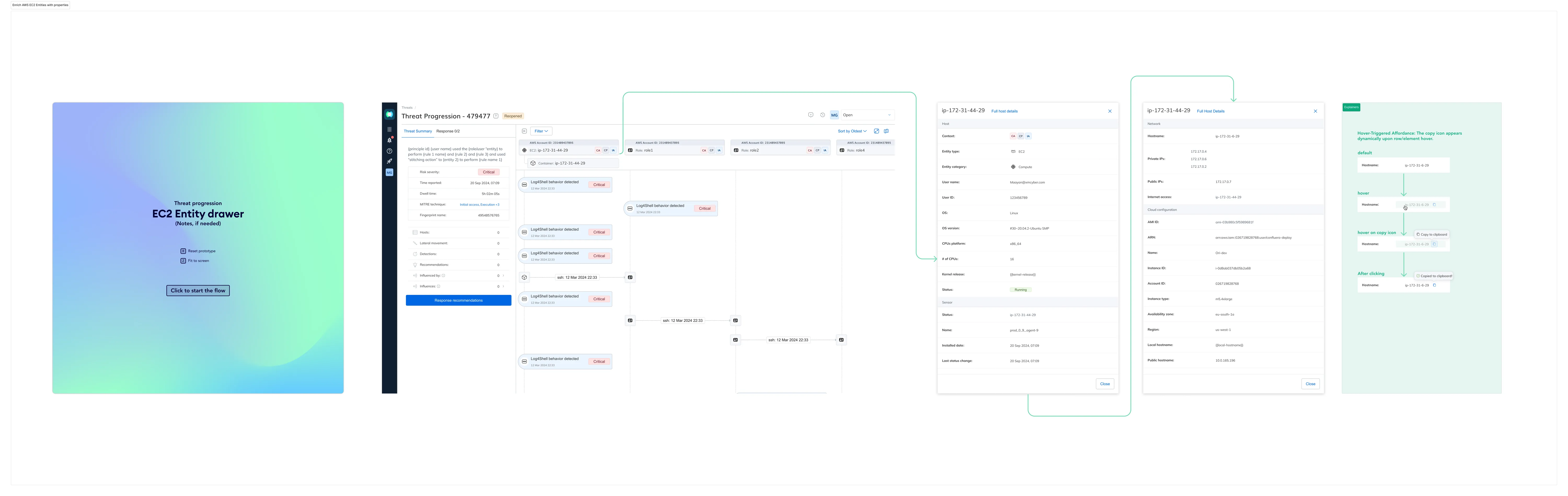
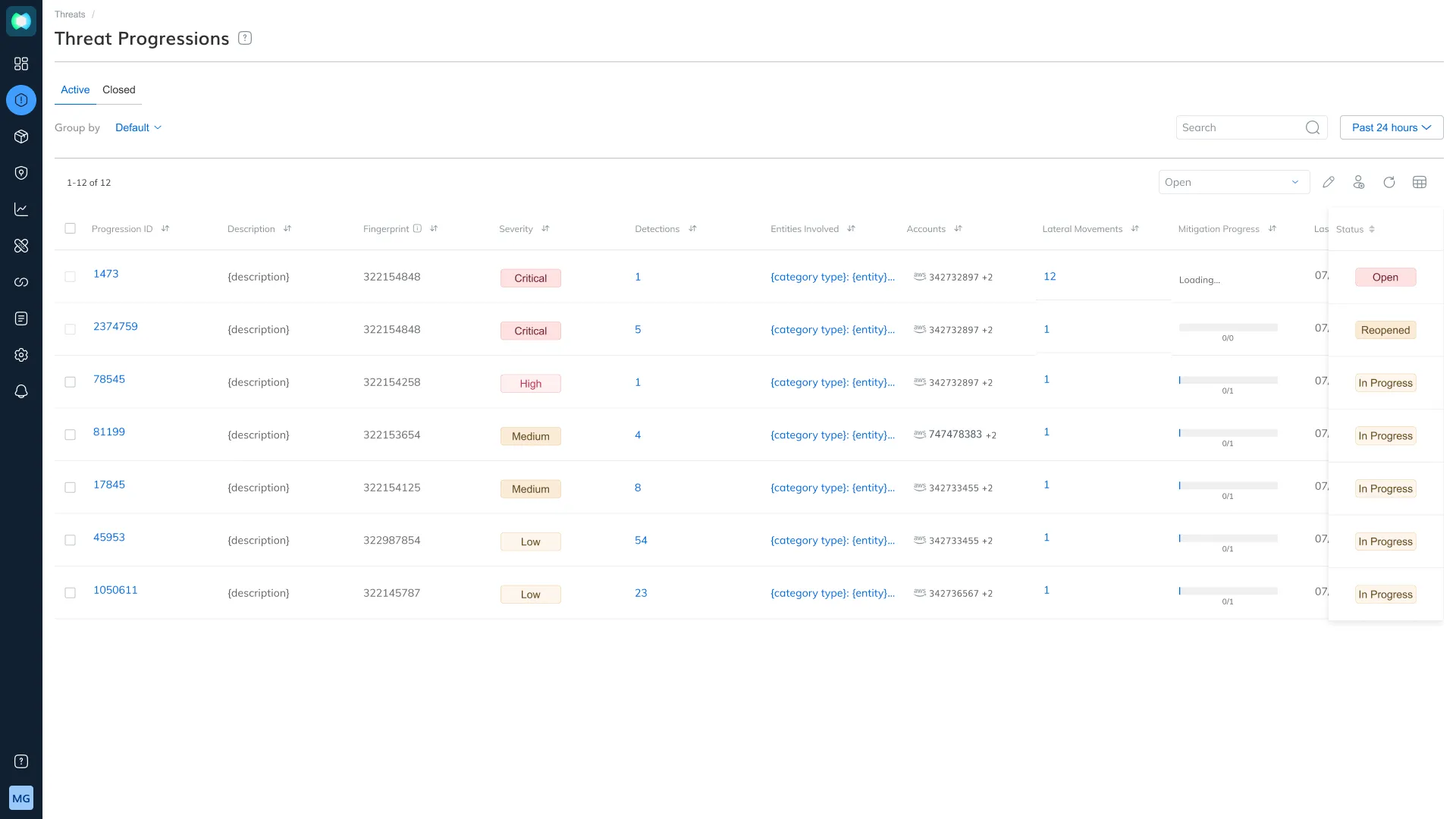
- Detection & Investigation Surfaces: Designed alert triage workflows and threat progression visualizations that stitch attack trails across hosts and cloud identities.
- Multi-Cloud Onboarding Rebuild: Designed unified connection and management experiences across Azure Monitor logs, AWS CloudTrail single accounts, and AWS at organization scale.
The Problem
- Zero Design Infrastructure: The acquired product arrived without design source files or documentation, requiring a complete reverse-engineering of production code into Figma before integration could begin.
- Disconnected User Experience: The acquired portal used proprietary tokens and components. Unintegrated, users moving from exposure management into detection experienced jarring visual seams, inconsistent spacing, and conflicting terminology.
- Architectural Dilemma: A full code rebuild was financially unviable for a working product, while a surface-level visual reskin would leave two divergent codebases that drift apart over subsequent releases.
- Complex Multi-Account Onboarding: Detections rely entirely on continuous log streams, and enterprise customers never connect a single isolated account. AWS Organizations span dozens of member accounts and Azure tenants contain multiple subscriptions, each with independent health statuses.
- Risk of Silent Failures: Sub-accounts can drift into error states independently. The primary risk was not user confusion, but broken log connections that go unnoticed while detection coverage silently degrades.
- Fragmented Integration Architecture: Cloud source connections were managed in an isolated setup area rather than within the platform's centralized integrations hub.
Business Goals
- Unify Acquired IP: Seamlessly embed cloud detection into the core platform without disrupting existing user workflows.
- Accelerate Time-to-Value: Simplify complex multi-cloud log onboarding to reduce time-to-first-detection.
- Ensure Operational Visibility: Provide proactive connection health monitoring to prevent silent coverage gaps.
- Standardize Design Infrastructure: Eliminate legacy design debt by migrating the acquired portal onto the unified XMDS architecture.
Target Audience
Enterprise security teams, DevSecOps engineers, and cloud administrators responsible for multi-cloud infrastructure and active threat detection.
User Persona
- Two distinct roles interact with the detection interface:
- The Cloud Administrator: Possesses privileges to deploy infrastructure into production cloud environments. Requires full transparency into deployment scripts and needs multi-account connection health readable at a glance.
- The Detection Analyst: Triages incoming threats and requires stitched attack progressions that present a coherent trail across hosts and cloud identities rather than disconnected event logs.
Research & Discovery
- Reverse Engineering Production Code: Because no design assets existed, initial research required auditing live production code to map every UI element, state, and dependency into a structured Figma library.
- Engineering-Led Discovery: Collaborated directly with acquired R&D teams to understand threat stitching algorithms, sensor behaviors, and log ingestion constraints.
- Continuous Field Feedback: Gathered insights from sales engineers and customer success teams as the product progressed through design partner testing and general availability.
- Onboarding Telemetry: Analyzed connection funnel drop-offs to pinpoint technical friction points during multi-account setup.
Product Goals
- Systemic Migration Mapping: Map every legacy component and token directly to an XMDS equivalent, reserving custom development strictly for genuine gaps.
- Native Platform Integration: Ensure cloud detection onboarding feels identical to standard platform integrations.
- Proactive Connection Health: Surface granular account status and health telemetry directly within primary management views.
- Transparent Technical Execution: Present real infrastructure commands (such as PowerShell scripts and StackSets) clearly rather than hiding them behind opaque wizards.
Solution
Component Migration Mapping & Figma Ecosystem
Created the complete Figma library from production code and authored a master migration matrix. Every legacy asset was mapped against its XMDS equivalent, Figma source, code reference, and migration effort rating. Tokens (color, typography, spacing, radius) were migrated first to ensure components built upon shared primitives.
- Rationale : Establishing a clear mapping made engineering costs explicit, enabling leadership to fund and schedule the migration predictably.
- Trade-off : Inherited minor legacy structural constraints where acquired workflows did not map perfectly to existing platform patterns.
Native Integrations Hub Alignment
Relocated CDR cloud onboarding into the platform's unified integrations area rather than maintaining a custom setup portal.
- Rationale : An acquired product earns its place in a platform by adopting core navigation and setup patterns natively.
- Trade-off : Complex provider-specific setup requirements had to be adapted to fit a shared integration framework.
Unified Sub-Account Management
Modeled cloud integrations as single parent entities containing multiple member accounts or subscriptions, each displaying independent health states alongside granular pause, resume, and delete controls.
Integrated proactive health status badges (Healthy / Degraded / Disconnected) with direct inline diagnostics at both the parent integration level and individual sub-account rows.
- Alternative Rejected : Treating every sub-account as an independent top-level integration, which creates inventory clutter and obscures connection health.
- Trade-off : Management controls depend on granular backend API availability per sub-entity.
Dual AWS Onboarding Paths
Designed distinct setup flows for AWS Single Account (per-account role delegation) and AWS Organization (StackSets deployed across member accounts) that converge into a unified management interface.
- Rationale : Technical setup mechanics differ fundamentally between single accounts and organization-level deployments. Presenting them accurately prevents configuration errors.
- Trade-off : Introduces an initial decision point requiring precise interface copy so administrators select the correct path immediately.
Transparent Infrastructure Steps
Exposed PowerShell commands and StackSet templates as explicit, readable steps with full technical context.
- Rationale : Technical administrators require complete visibility into scripts executing within production cloud environments.
Live Threat Progression Visualizations
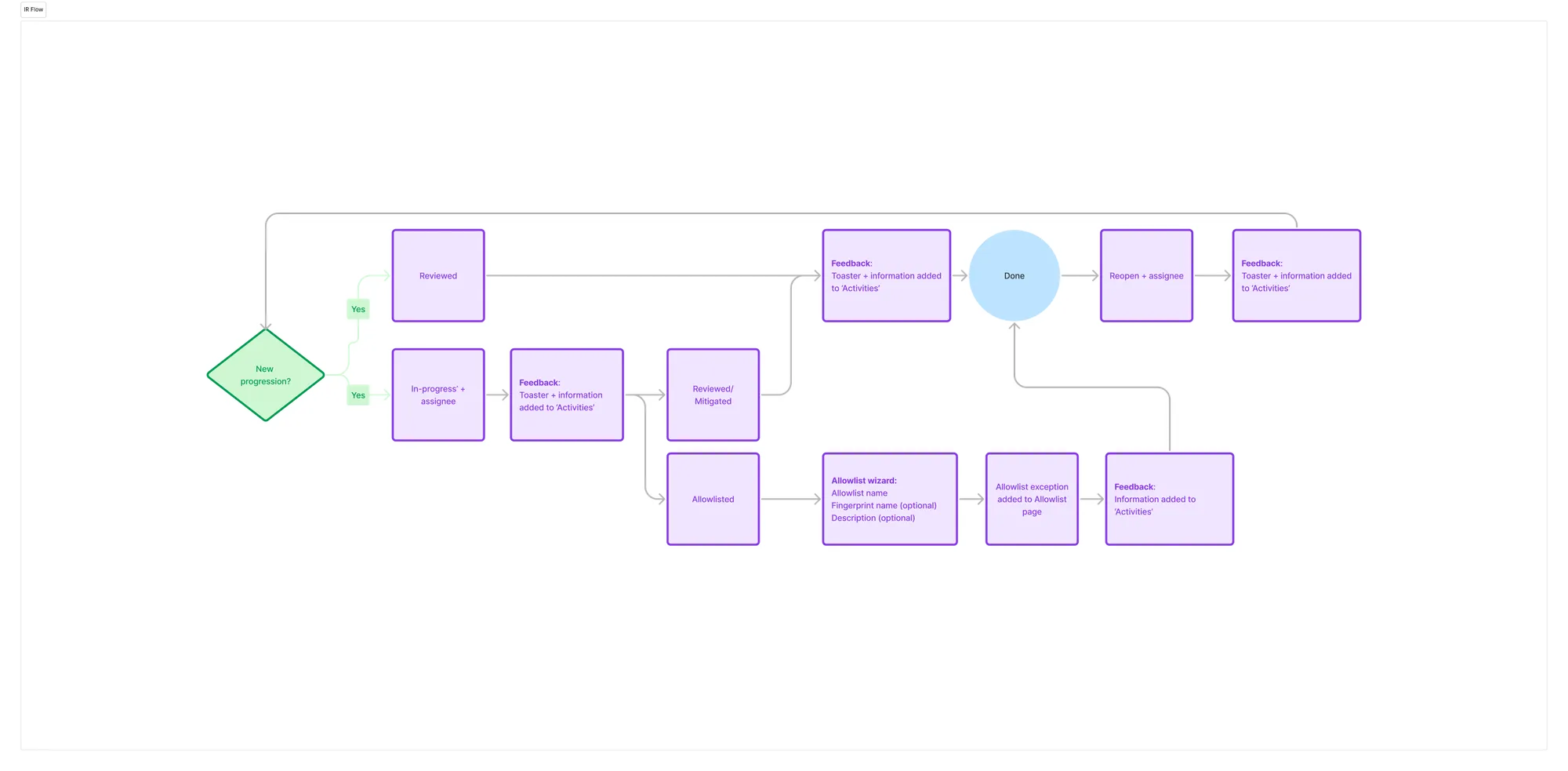
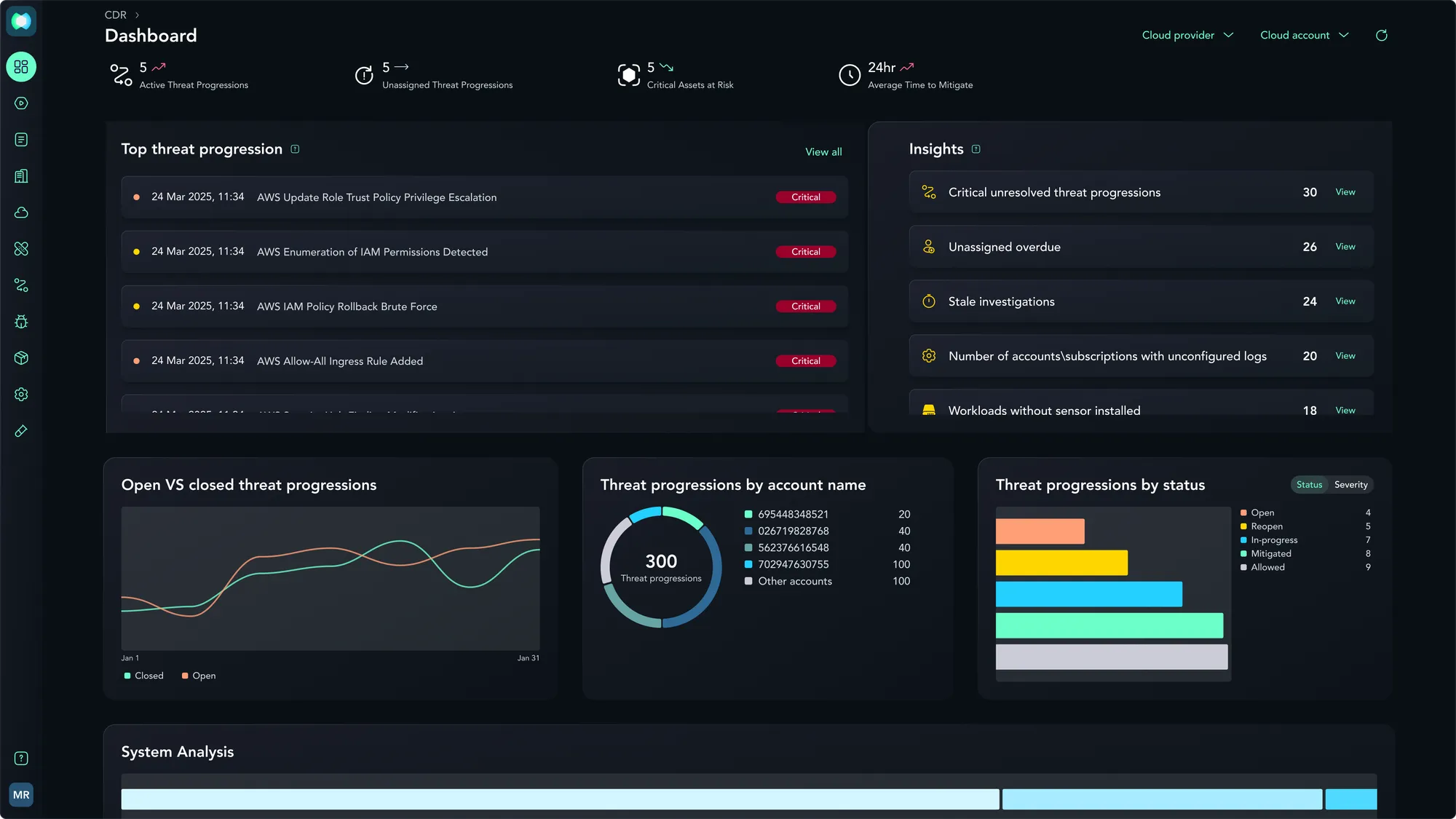
Visualized live threat progressions using active temporal indicators and status badges, contrasting live event sequences against CTEM's predictive path modeling to give analysts immediate clarity on active vs. theoretical risks.
UX Flow
Old Flow :
- Isolated portal
- Divergent visual language
- Manual setup outside main integrations
- Hidden connection failures.
New Flow :
- Centralized integrations hub
- Select provider and deployment scale
- Execute transparent technical steps
- Validate connection
- Manage sub-accounts with proactive health telemetry.
Outcome & Status
- Full Migration Shipped: The acquired portal was fully migrated onto the XMDS design system using the mapping architecture and Figma library built from scratch.
- Integrations Delivered: Onboarding, validation, health monitoring, and day-two management shipped across Azure and AWS provider pathways.
- GA Readiness Achieved: Successfully transitioned the product through general availability and active design partner deployment.
Initial Measurements & Telemetry
Defined telemetry parameters alongside product management to track setup efficiency and system health:
- Onboarding Completion Rate: Tracking percentage of initiated setup flows that successfully reach a healthy live data state.
- Healthy vs. Error Account Ratio: Monitoring connected sub-accounts to verify that connection breakages are flagged proactively.
- Day-Two Control Engagement: Tracking usage of pause, resume, and delete actions per sub-account as an indicator of self-service management.
- Provider Adoption Split: Measuring active integrations by provider (AWS vs. Azure) to inform future multi-cloud development priorities.
UI Designs
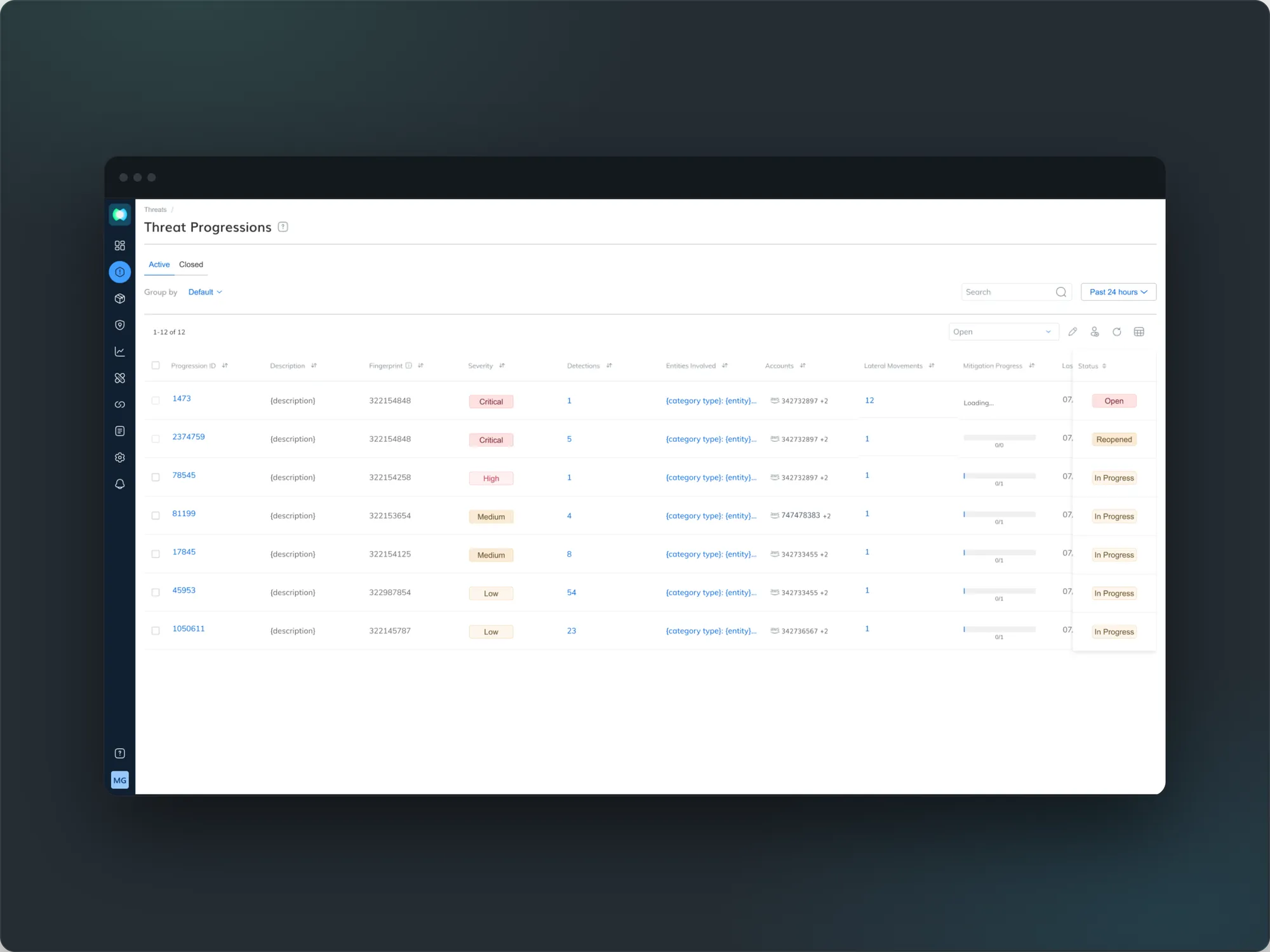
Live Attack Progression Table: Stitching real-time cloud events across hosts and identities into prioritized threat trails.
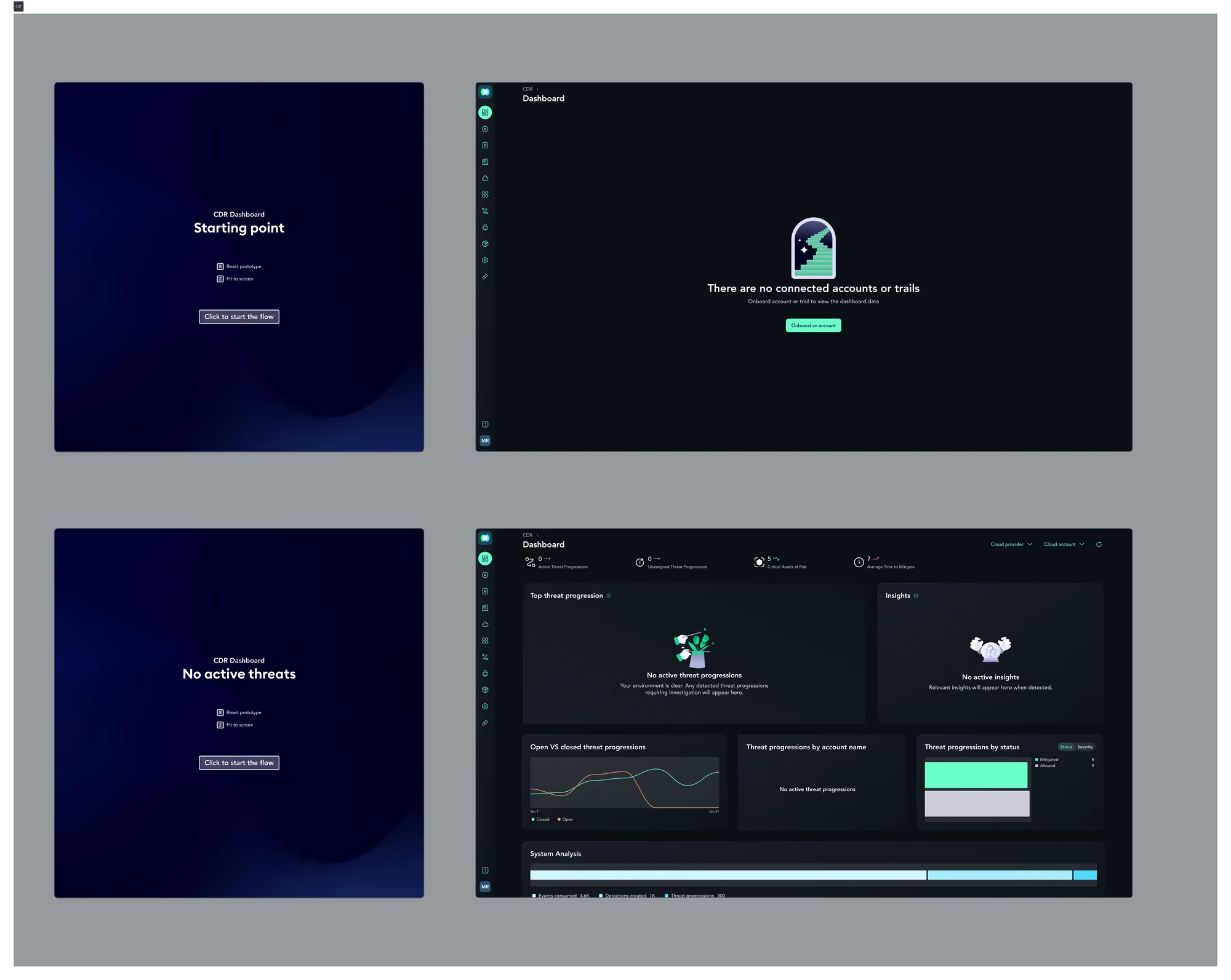
CDR Operational Dashboard: Surfacing active threat counts, unassigned investigations, and log coverage health at a glance.
Empty States: Designing the zero-data dashboard for environments not yet connected and for environments with nothing active to investigate.